
Picture mode is a specific group of settings that provide a preset configuration.
Set picture mode to Standard or Natural to watch the WindowSight content in the least altered way. Try to avoid picture modes such as Movie, Game or Sports.
Brightness adjusts the depth of blacks on the screen. Most TVs do a good job with its own default/auto configuration.
If you want to configure it yourself:
- Open the BRIGHTNESS file of the model pattern.
- Set the brightness to the minimum value.
- Increase it until you see lines 19-21 on the left.
This setting adjusts the amount of detail present in bright images. It should be close to correct by default, but sometimes be improved with a bit of tweaking.
- Open the CONTRAST file of the model pattern.
- Set the contrast value to the minimum.
- Increase it until only lines 230-234 appear in the model pattern.
When configuring it, avoid “washing out” the image and losing information.
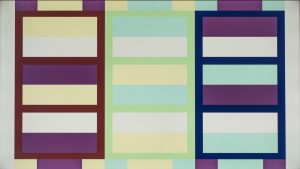
The Color or Saturation setting describes the depth or intensity of color present within an image.
To set the right color/saturation:
- Open the COLOR-SATURATION file of the model pattern.
- Look at the image through a blue filter.
- Adjust the color setting so that the blue box on the far left looks like the smaller gray boxes within.
Faded Color:
Correct Color:

Maximum Color:

Too much color/saturation will oversaturate the picture. Too little will wash out the color of the image.
This setting is generally correct in most TVs by default.
This setting adjusts the amount of green and red tint to the image or video on our TV. It should be set correctly by default in our TVs.
To adjust the tint-hue setting, using the model pattern:
- Open the TINT-HUE file of the model pattern.
- Look at the image through a blue filter.
- Move the parameters until the magenta and teal boxes (located in the blue and red columns) look identical.
Sharpness increases edge contrast in order to display the image more clearly. It doesn’t bring more detail or increase resolution.
To adjust Sharpness properly:
- Open the SHARPNESS file of the model pattern.
- Set Sharpness to the highest setting on your TV.
- Decrease Sharpness until the lines look normal and no geometric patterns appear.
The backlight setting determines the brightness of the LEDs that are used to light up the image. The higher the setting, the brighter the picture will be.
This setting should be adjusted to the specific viewing conditions. We recommend to avoid the ultra-high setting so as not to overexpose the image.
This setting is present in LED TVs and QLED TVs, but not in OLED TVs, since these don’t need a separate backlight.